

Most second-language sites get bolted on later, as a plugin, a duplicate site or a horrible spreadsheet of translation strings. They work, more or less, until someone needs to change a headline in three languages at once, or wonders why the Japanese pages never turn up in search.
We build multilingual sites on Sanity so that the second language is part of the site from the start. This is the first in a short series about how we do it, and it covers the overview: what Sanity is, the main decisions we make when setting up a multilingual site, and what those decisions mean for the people who will run it. Part 2 looks at your translation workflow, including AI translation and term bases.
Where multilingual sites go wrong
The problems with multilingual sites tend to show up in two places: in search results, and in the editor your team uses every day.
In search, each language version needs its own address so that Google can find it, index it and show it to the right people. Sites that switch language with a cookie or a script often end up with only one version indexed, which is usually the English one, so a customer searching in Japanese finds nothing. Sites that duplicate their pages without telling search engines how the copies relate can end up competing with themselves, or showing the wrong language to the wrong audience.
In the editor, the problems are slower but more expensive. Translations sit in a spreadsheet that drifts out of date, or in a plugin that only translates part of the page, and the people running the site end up waiting on a developer for changes they should be able to make themselves.
What Sanity is, and why we build on it
Sanity is the content system we build on. Your text, images and translations all live there, and the website draws its content from it. We shape the editor around your team, so the people running your site can update it themselves.
The useful thing to know as a founder is that Sanity doesn't decide how your content is organised or how your site looks. We decide that with you, which is why it suits multilingual sites so well: languages can be built into the structure of the content from the first day, instead of being layered over a site that was designed for one.
For your technical lead, Sanity is a headless CMS. Content is stored as structured data and the front end requests it through an API, so the same content can feed a website, an app or anything else that needs it.
Two ways to translate: block by block, or page by page
Sanity gives us two ways to store translations, and choosing between them is one of the first decisions on any multilingual project.
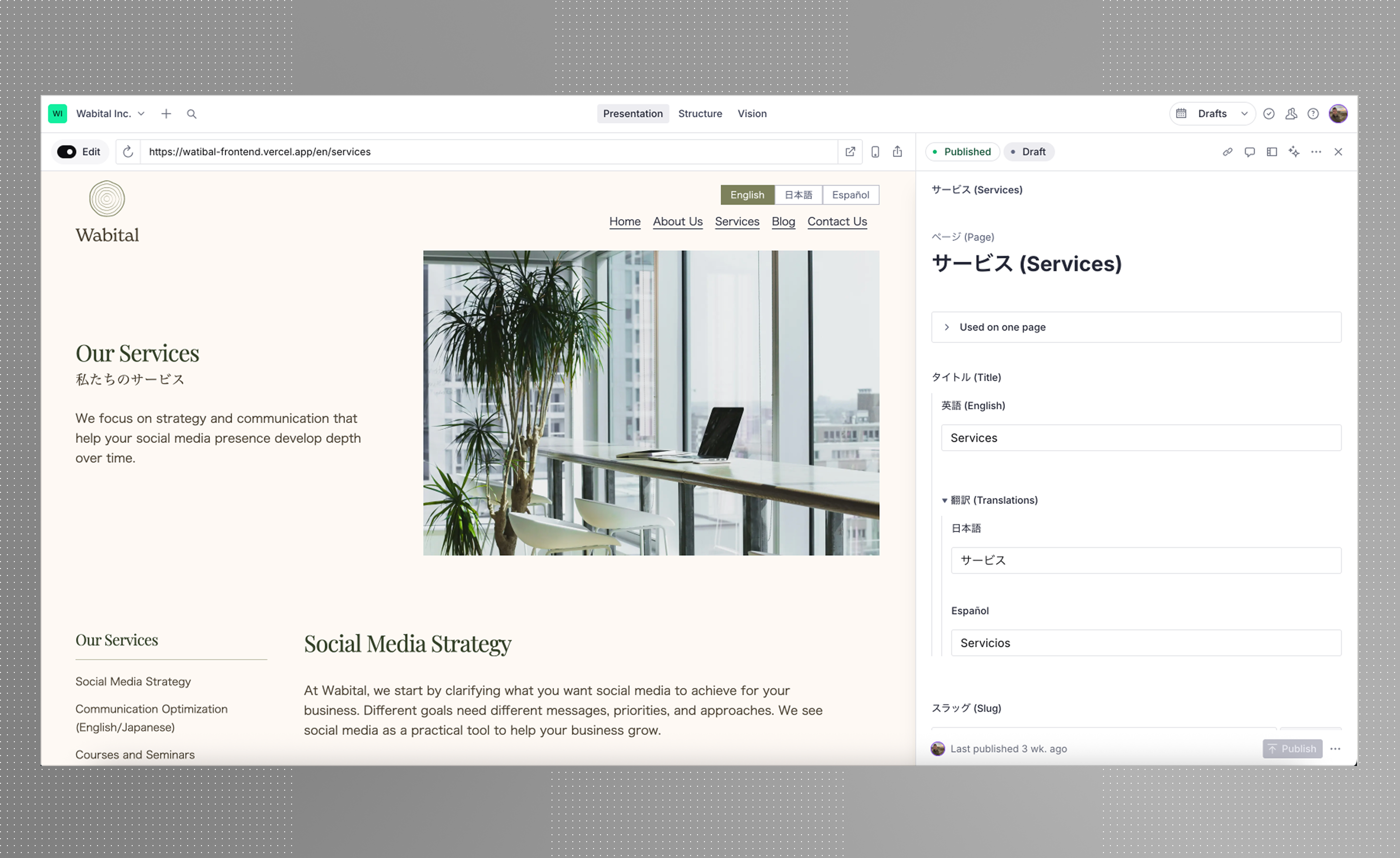
The first keeps a single document for each page, with every language stored inside it. Each block in the page builder, whether it's a heading, a section of text or an image caption, holds its own translations, so the layout stays identical across languages and editors can see the English and Japanese side by side. This is how we built the site for Wabital.
The second gives each language its own document. A page that works in London doesn't necessarily work in Osaka, so each language version can have its own layout, imagery and structure, and can be published on its own schedule. Or if you'd like to keep it all the same, that's your call too.
| One document per page | One document per language | |
|---|---|---|
| Layout | The same in every language | Can differ by language |
| Publishing | All languages publish together | Each language publishes on its own |
| Editing | Languages side by side in one place | Each language edited seperately |
| Suits | Sites where every market gets the same pages | Markets that need different pages, offers or imagery |
Which one we choose depends heavily on your markets and on who will be updating the site. A small team keeping one site in two languages usually wants everything in one place, whereas a company with its own team in Japan, writing for its own market, usually needs pages it can shape independently. The two approaches can also sit together on one site, so product pages might be shared while the Japanese homepage gets a layout of its own.
One page per language, properly indexed
Whichever approach we use, every language gets its own address, such as yoursite.com/ja/about. Search engines can then index each version separately, and a link to the Japanese page always opens in Japanese.
Each page also tells search engines which other language versions exist, using hreflang tags. This is how Google knows to show the Japanese page to someone searching in Japanese and the English page to someone searching in London, instead of treating the two as duplicates.
An editor set up around your languages
Rather than having an off-the-shelf solution that includes features you'll never touch, your editor gets set up around your languages and your goals. Everyone sees what they need, and nothing that they don't. For example, translators can access the Translation Memories and Term Bases, while general marketers cannot.
Translation is built in from the start. Switch a language on when you're ready and it works across the whole site, and if you add a language after launch it fits in as though it was always there.
Translation inside the editor
We also wire in translation plugins that we've built ourselves. Our machine translation plugin gives translators a first draft to work from, and we can bring your translation memory into Sanity, so past translations are right there in the editor and your translators work in one place instead of switching between tools.
Part 2 of this series goes through that workflow properly: where AI translation helps and where it doesn't, and how term bases keep your brand's vocabulary consistent from one language to the next.
Case study: Wabital
Wabital Inc, a social media company based in Japan needed a site in English, Japanese and Spanish. We built it with a single document for each page, so every block in the page builder carries its own translations and the layout is the same in every language.
As Wabital is a small company, this approached suited them well as it kept content all in one place and easy to compare against different languages.
You can read more about the project here.


