
If you run marketing at a company that has been told it should move off WordPress, your concern is probably a practical one. You know where everything lives in WordPress: which plugin handles the SEO titles, how to duplicate last month's landing page for a new campaign, and roughly what will break if you press the wrong button. Moving to Sanity can sound like trading all of that for a system your developers like and your team has to learn from scratch.
The version of this story you may have heard is the one where, six months after launch, the marketing team needs a developer to publish a blog post. That does happen, but it happens when a Sanity site is set up around the developers' convenience instead of the people who edit it every day. This piece is about what your team will notice when a WordPress to Sanity migration is done properly, including the parts that take some getting used to.
Why the move usually starts with the developers
Most migrations are proposed by developers, and the reasons tend to be about work your team never sees: plugin updates, plugin conflicts, and the servers WordPress runs on. In October, the PHP project published fixes for two critical flaws in PHP, the language WordPress is written in, which let an attacker run their own code on an unpatched server. Within a week, the US Cybersecurity and Infrastructure Security Agency had added one of them to its list of vulnerabilities known to be exploited.
None of that was WordPress's fault, and a good host would have patched it straight away. It is a fair example, though, of the upkeep that comes with running a PHP site, and on a Sanity build the front end isn't served by PHP, so that particular job doesn't land on anyone's desk. It is also a reason to move that your team will never feel day to day, which is why the editing side needs to be part of the brief from the start rather than worked out after launch.

What stays the same
Much of the first day is recognising familiar tasks in a new place. You still write pages, add images, save drafts and publish when you're ready, and the text editor handles headings, links, lists and bold text the way you would expect. Every document keeps a history of its changes, so you can see who changed what and roll back to an earlier version if something goes wrong. Nothing goes live until someone presses publish, which is the same reassurance WordPress gives you, behind a different button.
Pages become content with a shape
The biggest change is how pages are built. In WordPress you open a page and assemble it from blocks on a blank canvas, which is flexible but is also how sites end up with five slightly different versions of the same call to action. In Sanity, each kind of content has its own set of fields designed around what it needs to say. A case study on our own site, for example, has a client, an industry, the services involved, the brief and a testimonial, and the Studio asks for each of those in turn.
Because content is stored this way, one piece of it can appear in several places without being copied. A testimonial written once can sit on the case study, the homepage and a service page, and correcting a typo in it corrects it everywhere. It also means a well-meaning edit can't break the layout, because the design of each section is fixed and editors work with what goes inside it.
Seeing your changes before they go live
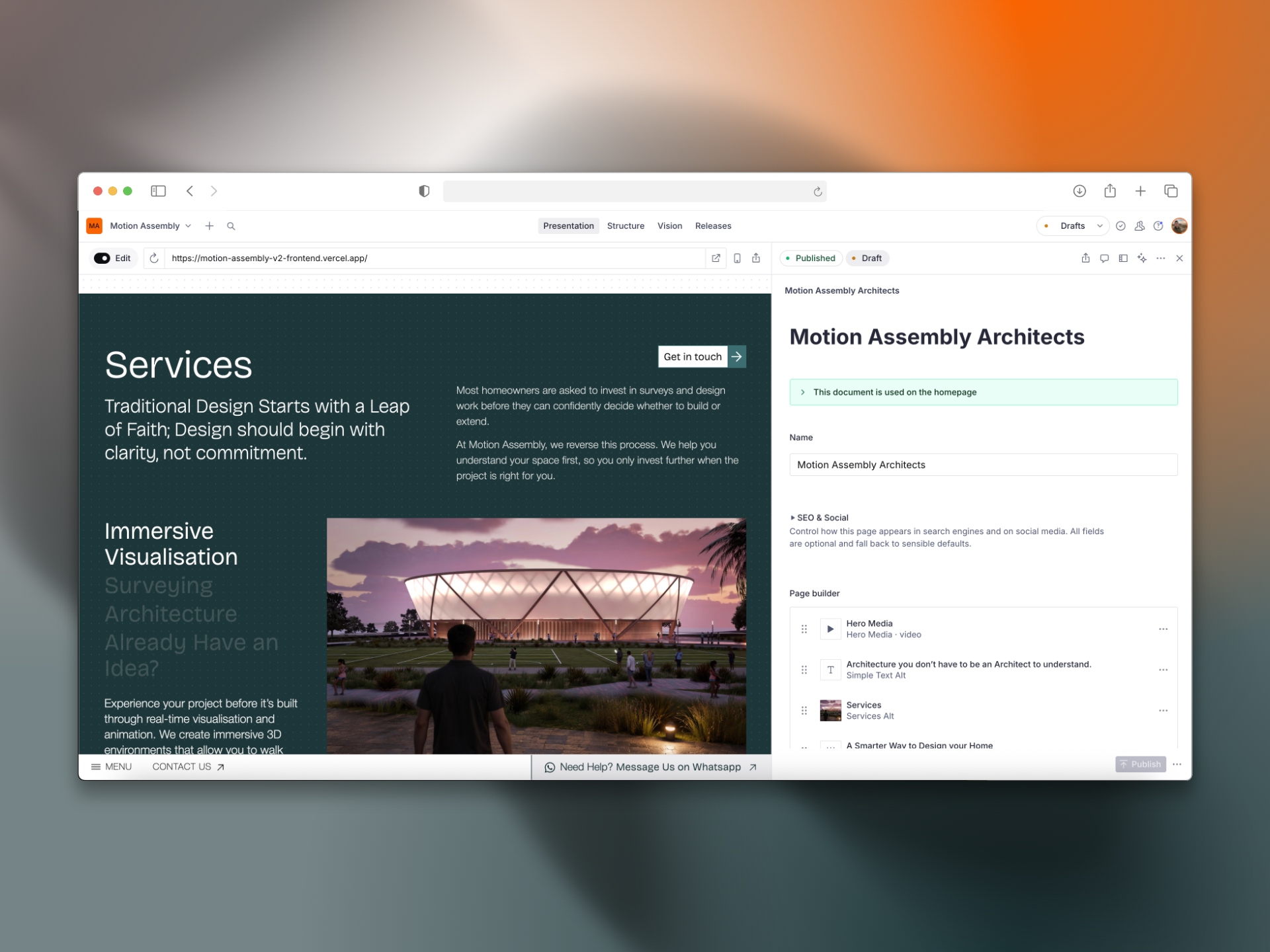
A common worry about headless systems is that you edit in a form and hope the page looks right. Sanity's Presentation tool answers most of that: it shows the site beside the editor, and clicking a heading or an image on the page opens the field that controls it. When we built the site for Motion Assembly, an architecture practice, this was the feature that mattered most to the client, because it meant he could update content without trawling through menus to find where something lived.
Where Yoast and your plugins went
In WordPress, much of a marketing team's toolkit arrives as plugins: Yoast or Rank Math for search, plus separate plugins for forms, analytics and redirects. On a Sanity build, the parts you edit become part of the Studio itself. Each page has fields for its search title, meta description and social sharing image, and those fields can warn you when a description runs too long or a page is missing an image, so the checklist Yoast gave you is still there in a different form. Redirects can be managed in the Studio as well, which matters after a migration, when old URLs need to point somewhere sensible. We will usually handle this for you to make sure that the migration goes smoothly.
The trade-off is that you can no longer install a plugin on a Friday afternoon to add a feature, because new functionality is built rather than installed. In our view that is mostly a benefit, since fewer moving parts means fewer updates and fewer conflicts, but it does change who you call when you want something new.
The Studio is set up around how your team works
This is where Sanity differs most from WordPress, and it is the part of the brief most worth spending time on. Sanity Studio is configured in code, which sounds like a drawback for a marketing team until you see what it allows: almost everything about how the editing side looks and behaves can be shaped around the people using it. A few examples of what that means in practice follow.
Organised the way your team thinks
The sidebar doesn't have to be a list of content types. It can be grouped by campaign, region or product line, or by whatever your team actually uses to find things, and different people can see different views. A copywriter might open the Studio to the drafts waiting for them, while a marketing lead sees everything due to publish this month. Roles can separate who drafts from who publishes, so a freelancer can write without being able to put anything live.
AI built into the fields you already use
Sanity's AI Assist plugin puts AI tools inside the editor, attached to specific fields and documents. Instead of copying text into a chat window and back again, your team runs instructions written for your content: draft a meta description from the article, suggest headlines in your house style, write alt text for an image. Each instruction is written once and can be shared with everyone in the Studio, so the AI works from the same brief every time instead of whatever someone typed that morning. We write those instructions with you, using your tone of voice and the rules you already give your writers.
It is worth being clear about what this is for. It speeds up the routine parts of publishing and gives people a starting point, and everything it produces still needs a person to read it before it goes live.
Translation pipelines that run from the Studio
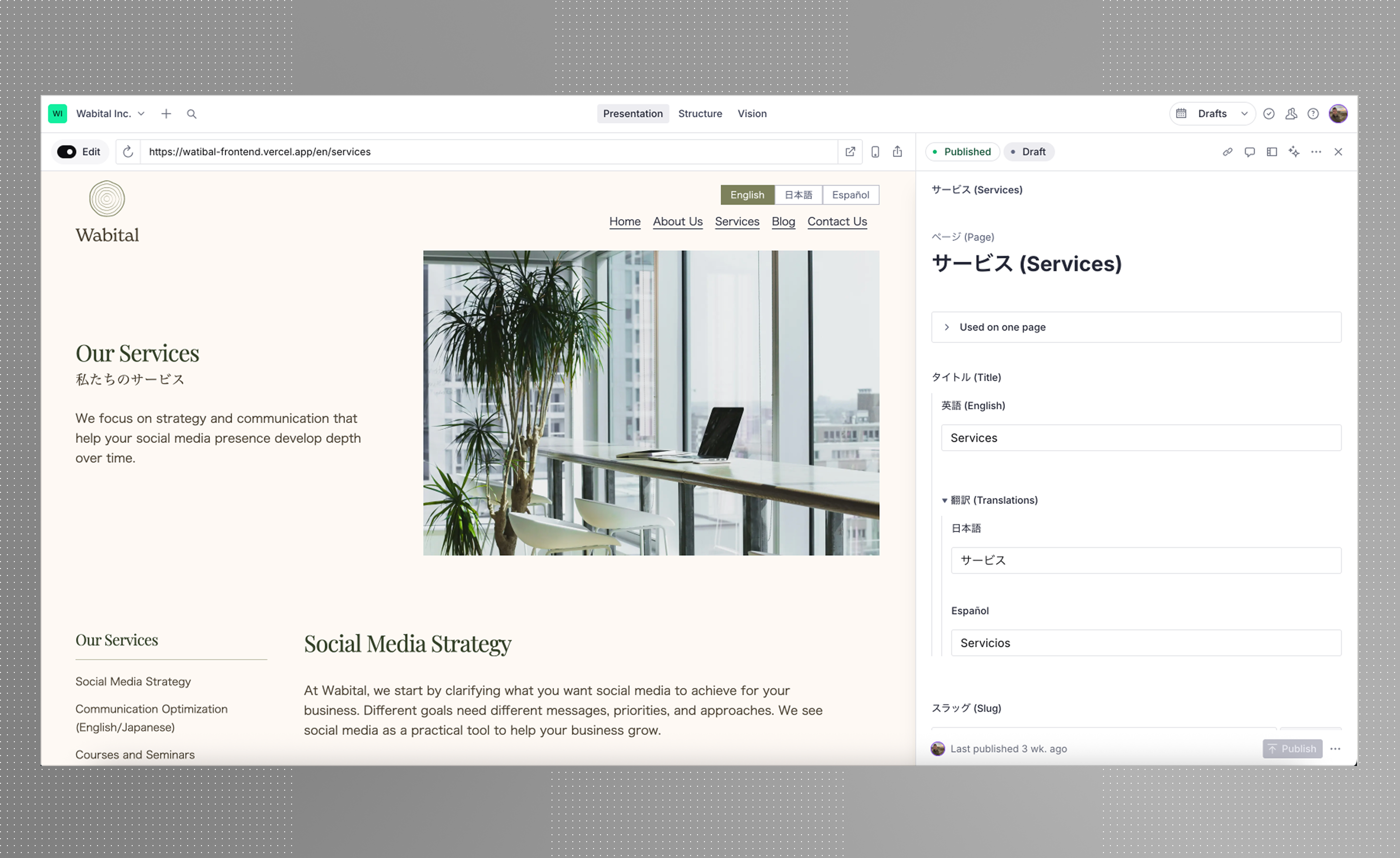
If your site runs in more than one language, translation can become part of the publishing process instead of a spreadsheet emailed to an agency. Sanity supports two approaches: a separate document for each language, linked together, or every field holding its translations side by side within one page. Which suits you depends on how different each language's version needs to be, and it is one of the first decisions we make on a multilingual build.
From there, the pipeline can be as manual or as automated as you like. Connectors for translation services let an editor send a document for translation, follow its progress and pull the finished translation back into the Studio. Machine translation can also run automatically whenever a page is saved, and AI Assist can translate fields against a style guide you set. A setup we like is machine translation for the first draft and a human reviewer for the pages that carry the brand, with the Studio showing which pages are still waiting for review.
Depending on your setup we can also build in term bases and translation memories so that your translations always follow your brand's voice.
Review, approval and scheduling
Editors can comment on specific fields and assign tasks to each other inside the Studio, so feedback stops living in email threads. Beyond that, the publish button itself can be changed: a document can be required to pass review before it publishes, or move through stages your team defines, from draft to legal check to approved. Groups of changes can be scheduled to go live together, which suits a product launch where twenty pages need to change at nine o'clock on a Tuesday. [TK: Sanity's Content Releases feature is only on certain Enterprise plans; check what scheduling is available on the plan we'd recommend.]
Connected to the rest of your tools
Because the content is structured, the same product description can feed the website, an email platform or an app without being retyped, and actions can run when something is published, such as posting to a Slack channel or updating a product feed. In the past we have set up integrations that stores form submissions directly in the Studio and then pings the company slack so that nothing is missed.
None of this has to be in place on launch day. What matters is that the Studio can keep changing as your team does, so you are never waiting for someone else to release a plugin that does what you need.
What to ask for so you're never waiting on a developer
The worry this piece started with is a real one, and the way to avoid it is to be specific in the brief. Ask for content types that cover the pages you will need to create next year as well as the ones that exist today, such as a campaign landing page, an event or a new service. Ask for a set of reusable sections you can arrange within a page, so that a new landing page is something you put together yourself. Ask for help text on every field, in plain English, written for the person who will fill it in. We will always offer guidance on this so don't worry if you're not sure!
Then ask how your team will learn it. At the end of every build we record video guides that walk through your own Studio using your own content, so your team can update the site from the day it launches. Shogo from Wabital Inc. mentioned in his testimonial that this was particularly useful and meant he could dive in straight away. Finally, ask who looks after the Studio after launch, and how quickly a new field or content type can be added when you need one.


